7 Tips for Choosing the Right LiDAR Range
Choosing the right LiDAR Range is not about picking the largest number on a specification sheet. It is about matching dependable detection distance to real targets, operating conditions, and the job your system must perform. A sensor rated for a large, highly reflective target may perform differently on a dark object across a wet road. Small details matter.
Grand View Research estimated the global LiDAR market at about $1.6 billion in 2023 and projected continued growth through 2030. That expansion spans automotive, mapping, robotics, and industrial uses, each with different range demands. Market growth does not prove that one sensor fits every task. It does show why careful selection matters. Ouster co-founder and CEO Angus Pacala has described LiDAR as a sensor that “directly measures distance.” For buyers, the practical lesson is to check how that distance was measured: target reflectivity, detection threshold, scan settings, and test conditions can change the result.
These seven tips will help you compare range claims with the environment you actually face. Consider rain, dust, sunlight, mounting height, and the smallest target you need to detect. Check point density and field of view alongside maximum range. Then test the sensor with representative targets, not just a clean datasheet scenario. A cautious choice may be better. No specification replaces field testing.

Understanding LiDAR Range and Its Role in System Selection
LiDAR range describes how far a sensor can reliably detect a target, not simply its maximum advertised distance. A white wall and a dark jacket can return very different signals at the same distance. Rain, dust, target size, and viewing angle also affect usable range. Not distance alone.
System selection should start with the task. A warehouse robot may need dependable detection across a 20-meter aisle, while roadside mapping may require longer reach and finer detail. The USGS 3DEP Lidar Base Specification sets minimum pulse densities of 8 pulses per square meter for Quality Level 1 and 2 for Quality Level 2. These mapping benchmarks show why distance must be considered alongside point density: greater reach can leave fewer useful returns on a target.
Check the range specification’s test conditions, including target reflectivity and detection probability. Then compare those conditions with the actual scene. Allow extra margin for weather, motion, and surfaces that absorb or scatter light. A sensor that reaches farther on paper may still miss a narrow object at the edge of its field of view. It is tempting to choose the largest range figure; that shortcut can overlook resolution, update rate, and mounting height. I would treat the published maximum as a starting point, then validate performance with representative targets and distances before final selection.
Defining Application Needs and Target Detection Distance
Choosing a LiDAR range starts with defining what the sensor must detect. A warehouse robot tracking a dark pallet at 12 meters has different needs from a roadside unit detecting a large, reflective object farther away. Specify the target’s size, surface, movement, and expected distance. Be precise. “Detects people” is not a complete requirement; a person’s clothing, angle, and position can change the return signal.
Measure the farthest routine detection distance, then add a practical margin for dim surfaces, dust, rain, or bright sunlight. Check whether the stated range applies to a small, low-reflectivity target or an ideal test surface. Those conditions matter. A range number without its test conditions can create false confidence. In field trials, place representative targets at several distances and angles, including near the edge of the operating area. Record missed detections, not just successful ones. A larger range may sound safer, but it can increase cost or capture unwanted objects. I would not assume extra distance fixes poor placement; it may only move the problem. Start from real use cases, and revise the target distance when test results disagree with the original estimate.
Choosing LiDAR Range: Match the Application
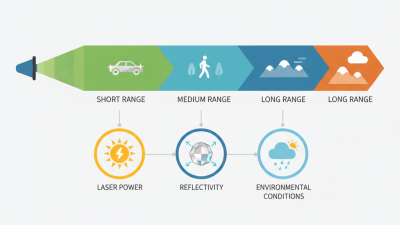
These are example planning distances, not guaranteed sensor performance or universal industry standards. Choose a range that covers the farthest target you need to detect, then validate it for target reflectivity, weather, mounting, and required detection reliability.
Evaluating Environment, Target Reflectivity, and Measurement Conditions
A LiDAR range figure is only useful when its test conditions match your site. Define the farthest target, then leave margin for weaker returns. A matte, dark surface can return less energy than a pale wall. Check the target’s reflectivity at the sensor’s wavelength, not just its visible color. Steep angles also reduce returned signal. Aim near perpendicular when possible.
Small details matter.
Compare specifications under the same assumptions: target reflectivity, ambient light, exposure time, and measurement accuracy. Bright midday sun can challenge some sensors; fog, rain, dust, and dirty windows can scatter or block light. For outdoor work, test across the actual route and weather window.
The USGS 3D Elevation Program Lidar Base Specification sets a 10-centimeter RMSEz requirement for QL2 elevation data. That is a mapping accuracy benchmark, not a promise of device range. Keep accuracy and maximum distance separate. Record both.
Repeat the test with dark and light targets at several distances. One clean run is not enough. It is easy to overlook a glass panel or a narrow reflective edge until field readings become inconsistent.
Comparing Range Specifications, Accuracy, and Field of View
Choosing a LiDAR range starts with the farthest object you need to detect, not the largest number on a specification sheet. Maximum range often assumes a highly reflective target and favorable conditions. A dark jacket, dusty air, or light rain can reduce reliable detection distance. Check the stated target reflectivity and test conditions. Small details matter.
Accuracy describes how close a measured distance is to the true distance; precision describes how repeatable readings are. They are related, but not interchangeable. Range and accuracy may also change with distance, so review performance across the working area. Test against a wall and a narrow pole at several distances. Results can vary. Even careful tests may miss changing sunlight or vibration, so leave some margin rather than designing around the best reading.
Field of view determines how much area the sensor sees at once. A wide view can cover a room or intersection with fewer units, but may provide less detail per object. A narrow view can suit a distant corridor, yet miss nearby activity outside its scan. Check both horizontal and vertical coverage, especially when mounting height is fixed. Compare these limits with your actual paths and obstacles. A specification looks tidy; a real site rarely does.
Testing Candidate Sensors and Confirming Performance in Practice
Treat a datasheet range as a hypothesis, not a deployment promise. In a controlled lane, place matte and retroreflective targets at measured intervals. Test them head-on, then at the angles expected in use. Geiger et al.’s KITTI benchmark paper, published in the International Journal of Robotics Research in 2013, documents a 64-beam lidar configuration with a stated range of 120 metres. That figure describes a sensor specification, not guaranteed detection in every scene. Record the target material, angle, distance, and missed returns.
Repeat it. Move tests outdoors and include the lowest-reflectivity objects your application must detect. The World Meteorological Organization’s International Cloud Atlas defines fog as visibility below 1 kilometre; log visibility during fog trials rather than labeling conditions simply “light” or “heavy.” Add rain, dust, sunlight, and nearby clutter where relevant. Check near-range blind spots too. A long-range pass can hide unreliable close detections. Compare results across repeated runs, and note where performance changes. Field logs are imperfect: target alignment and changing weather can skew results. That uncertainty deserves another test, not a confident guess.